
Core HR Agent
What Is an AI employee? How Digital Workers Are Joining Human Teams
- 01 October, 2026
- 10 Minutes
 Ami Tran
Table of Content
What if your next team member could work 24/7, follow processes, and handle routine tasks without constant human input?
An AI employee is an AI-powered digital worker that can take on specific responsibilities, follow business processes, and complete tasks with minimal human intervention. Unlike a traditional chatbot that mainly responds to prompts, artificial intelligence workers can work across tools and systems to move a workflow forward.
For businesses, introducing AI in the workplace means an AI workforce can step in – not to replace every human role, but to handle repetitive work and support employees in getting more done through AI and human collaboration.
In this article, we’ll explain what an AI employee is, what it can and cannot do, how it differs from traditional AI tools, and what businesses should consider before introducing one into their workforce.
Key takeaways
- AI employees are digital workers designed to handle specific roles, tasks, and workflows with less human intervention.
- They support a range of business functions such as HR, Customer Support, Sales, Finance, and Marketing.
- Unlike traditional chatbots or RPA bots, AI employees can work toward goals, use multiple tools, and handle different steps in a workflow.
- AI employees are not simply about replacing workers. They can reduce repetitive tasks and give employees more time for creative, strategic, and meaningful work.
- Businesses should start small by defining a role, connecting the right tools, setting clear guardrails, and improving through feedback.
What Is an AI employee?
An AI employee is a software robot powered by artificial intelligence (AI) that performs digital tasks to automate and improve work processes. Instead of answering one question at a time like a simple chatbot, artificial intelligence workers read a complex request, break it into steps, and work across tools such as email, CRM, and spreadsheets to complete the task.
One example is a digital worker designed for a Business Analyst role. It supports human teams by documenting requirements, writing user stories, summarizing meetings, identifying risks, and supporting UAT planning.
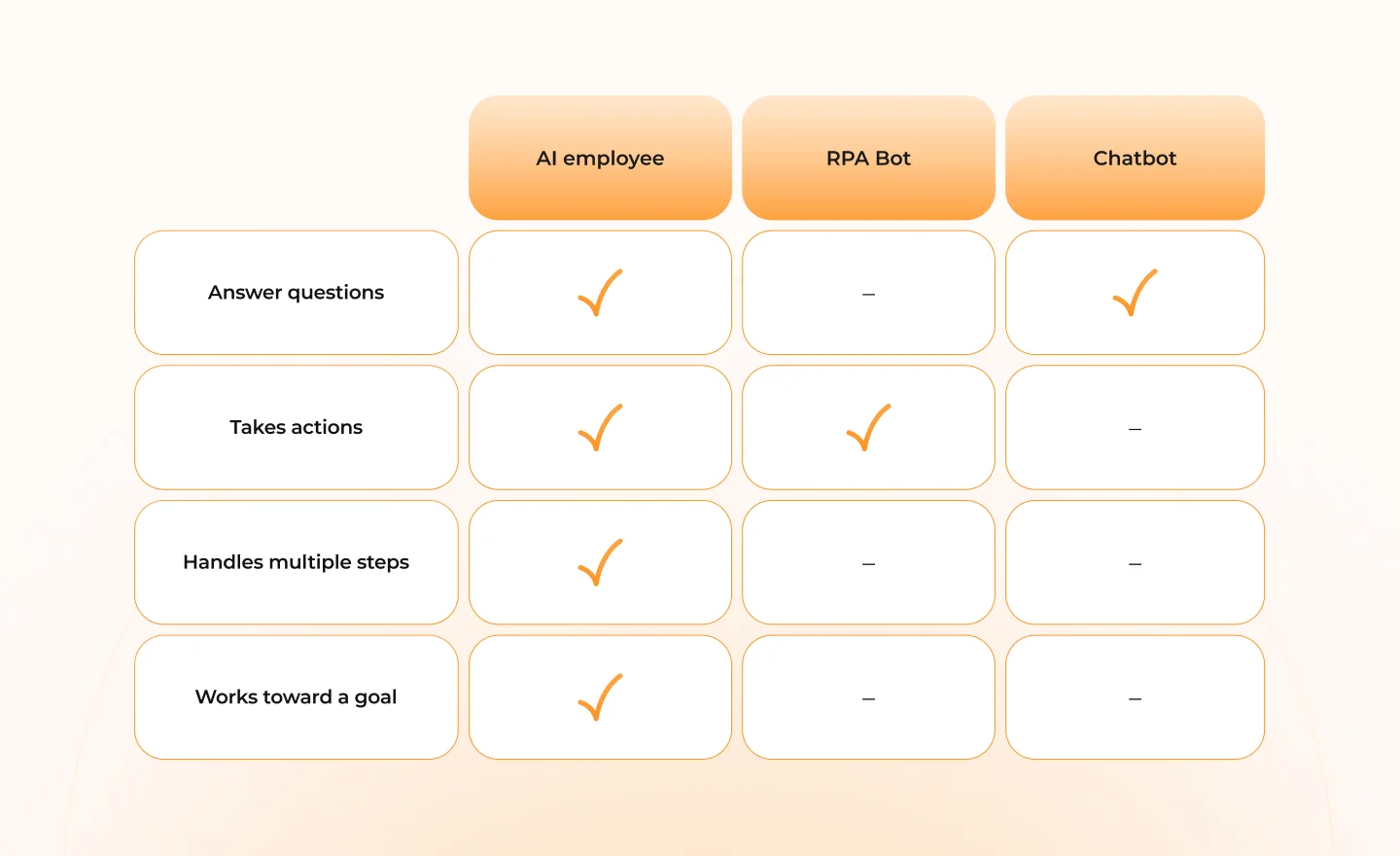
AI employee vs. Chatbot vs. RPA Bot — What's the Difference?
The key difference is what each technology is designed to do.
- Chatbot: Answers questions and handles conversations.
- RPA Bot: Follows predefined rules to perform repetitive and structured tasks.
- AI employee: Works toward a goal, handles multiple steps, uses different tools, and adapts to the situation.
While chatbots and RPA bots handle single-step tasks well, a modern AI workforce manages broader, end-to-end operational workflows with far less human supervision.
Where AI Employees Can Support Business Functions
AI employees can support different parts of a business, from handling employee requests and customer questions to managing Sales workflows, financial processes, and marketing tasks.
The key is not simply what AI can generate, but what work it can take responsibility for and complete across a workflow. Here is how AI in the workforce transforms 5 key business areas.
1. Human Resources
An AI employee can handle repetitive HR tasks such as screening resumes against job requirements, organizing candidate information, routing shortlisted candidates to hiring managers, and answering common policy questions. It can support employee onboarding and performance management by collecting information, tracking feedback, and preparing review materials.
By offloading this busywork, AI in employee retention plays a surprisingly direct role: HR teams spend less time on administrative work and more time on employee development and strategic workforce decisions.
Practical example
AI assistant to help HR managers with its quarterly promotion process. The agent collects and formats information from multiple systems helping the administrative workload for HR teams.
2. Customer Support
An AI employee can handle routine customer questions 24/7, using information from knowledge bases, customer accounts, orders, or other connected systems. When a request is too complex or requires human judgment, the AI can collect the relevant information and hand the case over to a human agent.
This helps customer support teams reduce repetitive workload while keeping human agents focused on more complex customer issues.
Practical example
In customer support, an AI assistant can handle common requests by quickly finding the right information across help articles, customer accounts, and service records. When an issue needs human attention, it can hand the conversation over to a support team member.
3. Sales
AI can support sales teams throughout the customer journey, from researching prospects, updating the customer relationship management (CRM), qualified leads and moving opportunities forward. By connecting to CRM and customer data, AI can use relevant context to personalize outreach and determine the next action in a workflow.
Instead of handling every follow-up manually, salespeople can focus on customer relationships and closing opportunities while AI takes care of routine sales activities.
Practical example
Sales teams can be supported by an AI assistant that helps manage leads, provides account insights, and assists with follow-up. It can work with customer and sales data to support different stages of the sales workflow.
4. Finance
Integrating AI in the workplace financial operations allows data collection, validation, reconciliation, and report preparation, which can be finished without humans in the loop. AI can move information through workflows and flag exceptions for human review through connecting different financial systems.
AI agents also affect auditing by breaking down audit procedures into smaller tasks, executing them automatically and producing structured reports. This can speed up the process and reduce manual errors.
Practical example
Finance teams can be supported by AI that uses advanced analytics to detect fraud and assess transaction risks in real time. It can analyze transaction context, customer behavior, and merchant relationships to support authorization and fraud-detection decisions.
5. Marketing
Artificial intelligence employees help marketers create content, turning briefs into drafts, researching audiences, and summarizing campaign performance. They can collect the information based on user prompts, generate content and provide supporting insights for users. This process can take only a few minutes, helping marketers reduce time for simple and repetitive tasks.
Practical example
Generative and agentic AI can support marketing teams in creating personalized content and delivering more relevant customer experiences. By analyzing customer data and behavior, AI can tailor content, optimize customer journeys, and improve marketing performance.
Explore Blazeup Agents to see how digital workers can take on everyday business tasks. Connect with your existing tools, and support your team end-to-end.
AI employees in the Workplace
AI adoption at work is growing, but there is still a gap between using AI as a tool and integrating it into everyday workflows. In 2025, 21% of U.S. workers said they used AI at least some of their work, up from 16% a year earlier. At the same time, 65% still used AI little or not at all.
AI agents are starting to close this gap by moving beyond simple prompts to handle tasks and workflows. Yet only 13% of employees said AI agents were broadly integrated into their workflows in 2025.
For SMEs without a dedicated AI team, turning AI adoption into practical workflows can be challenging. An AI employee platform like Blazeup can help bridge the gap by turning AI from a tool employees interact with into a digital worker that can support everyday business processes.
The Human + AI Workforce Model
AI employees are the best suited to repetitive, rule-based, and high-volume work. This creates a balanced AI and human operational model, where digital workers handle routine execution while people focus on work that requires human judgement.
Humans still play a central role in work that requires judgement, creativity, problem-solving, relationships, and accountability. As AI takes on more routine tasks, these human capabilities become more important rather than less.
Research from PwC found that junior roles most exposed to AI were 7x more likely than the least AI-exposed junior roles to require traditionally senior skills such as leadership.
The resulting model is not about AI taking over entire jobs, It is about dividing work based on strengths: AI handles routine execution and process-heavy tasks, while people provide judgement, make decisions, solve complex problems, and manage relationships.
Will AI Employees Replace Human Workers?
The narrative around AI replacing workers often overlooks how jobs actually evolve.
PwC’s 2026 Global AI Jobs Barometer analyzed more than a billion job advertisements and found that workers with AI skills can earn wage premiums up to 62%. This suggests AI skills are becoming increasingly valuable in the workplace.
The bigger opportunity is to help employees work more effectively with AI. Businesses can support this shift by giving employees opportunities to build AI skills, clearly communicating how AI will be used, and involving teams in the redesign of their workflows.
The goal is to combine the strength of both. AI can handle routine execution and high-volume tasks, while people focus on judgement, creativity, problem-solving, and decisions that require human context.
How to Onboard Your First AI employee
The best way to introduce an AI employee is to treat it like a new hire, not just a tool that waits for prompts. It needs a defined role, access to the right tools and information, clear boundaries, and a way to learn from feedback.
The goal is not to automate an entire job from day one. Start with one clear responsibility or workflow, see how the AI employee performs, and improve the setup as it becomes part of the team’s daily work.
Here are 5 steps to get started.

Step 1: Define what the AI employee is responsible for
Start by deciding what the AI employee will be responsible for. Choose a specific role, such as HR, Finance, or Sales Assistant, and define the clear task if it needs to be completed from start to finish.
Then give it the context needed to do that work. This can include company policies, customer information, internal documents, and business rules. For tasks that require judgement or brand sensitivity, keep human approval in the process.
Step 2: Give it the context it needs to work
Next, connect the AI employee to the information and system it needs to do its job. Intelligence alone is not enough if the AI cannot access where the actual work happens.
Connect relevant knowledge, business data, and tools such as email, CRM, Slack, HR system, or finance platforms. Start with the system required for its assigned workflow rather than connecting everything at once.
Step 3: Start with one workflow
Choose one workflow to automate first, preferably one that takes the team significant time and is repetitive, high-volume, low-risk, and easy to measure.
For example, instead of asking an AI Employee to manage all of HR, start with employee onboarding. It could collect documents, check required information, and update the HR system. Once the workflow performs reliably, expand its responsibilities.
Step 4: Put it where the work happens
Before the AI Employee starts working independently, define what it can do, what requires approval, and when it must escalate to a person.
- Let AI act independently: Send routine emails, update CRM, categorize tickets,…
- Require human approval: Approve expenses, send sensitive customer communications, and update important employee records,…
- Require escalation: Legal issues, sensitive HR cases, high-value financial transactions, and unusual customer complaints,…
These boundaries make it clear where AI can act independently and when human approval is needed.
Step 5: Review results and improve over time
Don’t set and forget your AI employee. Treat it like a new employee and review its performance regularly.
Track metrics such as time saved, errors reduced, workflow speed, and employee workload. Use feedback to improve its instructions and context. If AI employees perform reliably, then expand their responsibilities to more workflows.
Conclusion
AI employees are changing how businesses think about work. Instead of using AI only as a tool that responds to prompts, companies can give AI in the workforce specific responsibilities and integrate it into everyday workflows.
The goal is not to automate everything at once. Start with one workflow, prove its value, and gradually expand AI’s responsibilities while keeping AI and human collaboration focused on where judgement and oversight matter most.
Interested in integrating AI in the workplace?
Contact Blazeup to set up a consultation and see how digital workers can streamline your daily operations and handle routine tasks.
Frequently Asked Questions (FAQs)
1. What is an AI employee?
An AI employee is an AI-powered digital worker that can take responsibility for specific tasks or workflows, use connected tools, and complete work with limited human intervention.
2. What can an AI employee do?
AI employees can support tasks across HR, customer support, Sales, finance, and marketing, such as employee onboarding, customer inquiries, lead qualification, financial workflows, and content preparation.
3. What is the difference between an AI employee and a chatbot?
A chatbot mainly answers questions and handles conversations. An AI employee can work toward a goal, take multiple actions, use connected systems, and complete a workflow.
4. How do I start using an AI employee?
Start with one high-volume, repetitive, measurable workflow. Define the AI’s role, connect the necessary tools and information, set human approval rules, and review its performance before expanding its responsibilities.
5. Will an AI employee replace human workers?
AI employees are designed to support specific tasks and workflows rather than replace entire jobs. They can handle repetitive work while people focus on areas that require judgement, creativity, relationships, and decision-making.
6. Is an AI employee suitable for small and medium-sized businesses?
Yes. SMEs can start with a specific workflow instead of deploying AI across the entire business. This allows them to test the value of AI while keeping implementation manageable.
 Sathvik Bellave