

Core HR Agent
How AI Is Used in HR Management: 8 Practical Applications with Real Examples
- 08 May, 2026
- Max 30 min read
 Ami Tran
Table of Content
AI is getting more attention in HR, and budgets reflect that. McKinsey (2025) reports that 92% of organizations plan to increase investment, but inside most HR teams, the day-to-day use is still limited.
In many cases, AI is used for resume screening or small admin tasks. Some core workflows, such as approvals, data handoffs, and follow-ups, still depend on people verifying systems together. That’s why processes continue to feel slow even when tools are integrated.
The real issue isn’t adoption, it’s how little changes in how work actually runs. Adding tools speeds up parts of the process, but doesn’t remove the coordination between steps. As volume grows, that coordination becomes the bottleneck.
The shift now is practical, AI is being used to handle parts of the workflow end-to-end, including routing tasks, checking data, and dealing with routine exceptions without constant intervention. It reduces back-and-forth rather than just speeding up one step.
That’s the difference behind the use of AI in human resource management today. It’s less about isolated automation, more about how HR processes move from start to finish across the employee lifecycle.
This article covers 8 practical applications of AI in HRM, focusing on how they are used in real environments, where they create measurable value, and what to look for when adopting them.
Key Takeaways
- AI is transforming the entire HR lifecycle, from recruitment to offboarding, not just resume screening.
- It drives efficiency and personalization across hiring, onboarding, learning, and workforce planning.
- Predictive analytics and sentiment analysis enable proactive, data-driven HR decisions.
- Successful adoption requires managing risks like bias, compliance, and explainability with human oversight.
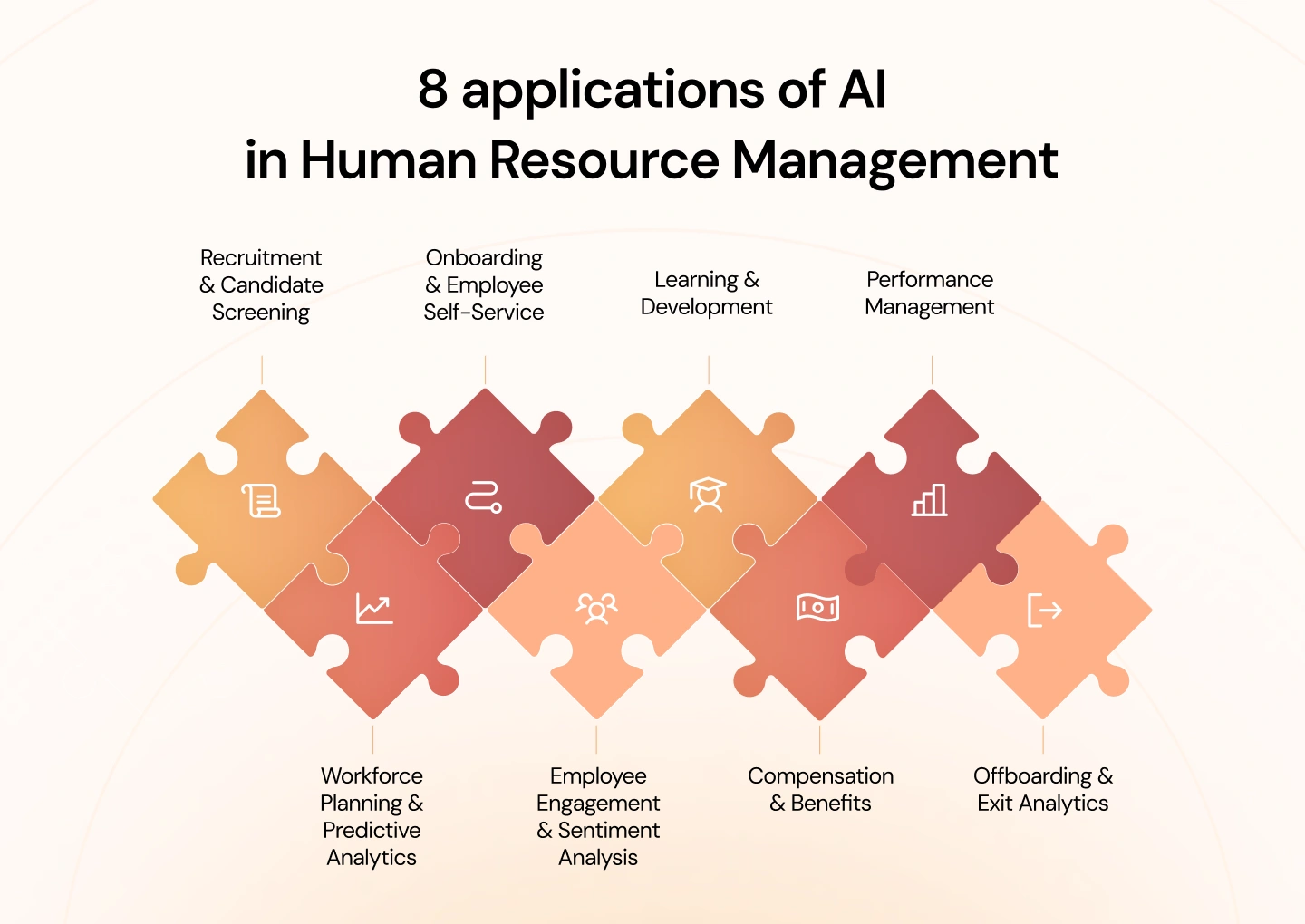
8 applications of AI in Human Resource Management
AI is now being applied across the full HR lifecycle, not just in isolated tasks. From hiring and onboarding to performance management and workforce planning, these applications reflect how organizations are starting to rethink HR as a connected system rather than a set of separate processes.
The following 8 areas show where AI is already making a measurable impact in day-to-day HR operations:
1. AI in Recruitment & Candidate Screening
Recruitment is one of the most resource-intensive parts of HR, especially at the top of the funnel. When a single role attracts hundreds of applications, the bottleneck is rarely sourcing; it’s screening, shortlisting, and coordinating next steps. This is where AI starts to make a noticeable difference, not by replacing recruiters, but by removing the time spent on repetitive evaluation and back-and-forth coordination.
What is it
AI-driven candidate screening refers to the use of algorithms and intelligent systems to evaluate job applicants automatically before a recruiter reviews them. In practice, this means the system reads applications (CVs, forms, profiles), compares them against role requirements, and determines which candidates are worth moving forward.
In recruitment workflows, this typically covers resume parsing, candidate ranking, and early-stage qualification. Some systems also interact directly with candidates, such as asking screening questions or guiding them through initial steps, so that basic validation happens without manual input.
The value is not only speed, but consistency. Every application is assessed against the same criteria, reducing variation in how candidates are filtered. It is making the shortlist more reliable, one of the more immediate benefits teams see from the use of artificial intelligence in human resource management.
How it works
In practice, AI screening moves through a few connected steps, each one trimming the pool and adding a bit more certainty before a recruiter steps in.
- Resume parsing and data structuring
The system starts by reading resumes in different formats and turning them into structured data. It pulls out skills, job history, tenure, and education, and can infer details such as overall experience or whether the candidate has led teams. - Rule-based filtering (knockout criteria)
Basic requirements are applied early, things like work authorization, mandatory certifications, or location constraints. Candidates who don’t meet these are filtered out at this stage, which keeps the rest of the process focused. - Contextual matching and scoring
For the remaining profiles, the system looks at how closely each candidate fits the role. It goes beyond keywords, recognizing related roles and transferable skills, then assigns a score based on relevance and depth of experience. - Interaction-based screening (chatbots or forms)
In some cases, candidates go through a short follow-up step where the system asks a few questions to confirm details or fill in gaps. The responses are either scored or summarized to help recruiters review them quickly. - Automated workflow execution
Once a candidate meets the threshold, the system moves the process forward, offering interview slots, notifying recruiters, and updating statuses, which removes a lot of the usual back-and-forth.
Practical example
Take a role that receives over 1,000 applications in a short period. Instead of going through each CV one by one, the system parses everything first, turning each application into structured data, and then filters out candidates who don’t meet basic requirements such as work eligibility or required certifications.
From there, it evaluates the remaining profiles, comparing experience, career progression, and relevant skills against the role. Some candidates may be asked a few follow-up questions to confirm details or clarify their background.
Within a short time, the system produces a ranked shortlist, often narrowing it down to a manageable group such as the top 50 to 100 candidates, along with a clear rationale for each. Those who qualify can move straight to interview scheduling, while others are updated automatically. Recruiters then focus their time on a much smaller, more relevant group rather than sorting through the full volume.
2. AI in Onboarding & Employee Self-Service
Onboarding tends to look straightforward until it actually starts. There are forms to collect, accounts to set up, policies to walk through, and training to complete, often spread across different tools. When HR manages this manually, even small gaps between steps can slow things down.
With AI in place, the flow is pre-wired. Employees can move through onboarding on their own, while the system keeps things aligned in the background.
What is it
AI-driven onboarding and employee self-service are systems that take ownership of onboarding tasks and routine employee requests. The system reads the context, such as role, location, policies, and guides the employee through what needs to happen next while answering common questions along the way.
This includes onboarding checklists, document collection, training paths, and policy queries. The same layer typically remains available after onboarding, so employees can check leave rules, benefits, or internal procedures without raising a ticket.
The real benefit is not just saving time. It is reducing how much coordination HR has to do. Employees can get answers immediately, and HR teams spend less time on repetitive back-and-forth, which is a common outcome of the use of AI in human resource management.
How it works
In practice, these systems are built around a simple idea: guide the employee step by step, while handling the tracking and follow-ups automatically.
- Workflow setup and task orchestration
The onboarding flow is defined ahead of time, based on role, department, or location. Tasks like submitting documents, setting up accounts, or completing training are assigned automatically and tracked in one place. - Personalized onboarding paths
The steps adjust based on the role. An engineer sees different tasks than someone in finance. The system filters what’s relevant so people aren’t working through a generic checklist. - Automated reminders and progress tracking
When tasks are delayed, reminders are sent without HR having to step in. Managers and HR can still check progress, but they do not need to follow up constantly. - AI-powered self-service (chatbots or assistants)
Questions come up as people move through onboarding. Instead of emailing HR, they ask the assistant. It pulls answers from policies and internal docs and responds immediately. - Ongoing support after onboarding
Once onboarding is complete, the same system continues to handle routine requests—leave questions, document access, simple process queries—without switching tools or channels.
Practical example
A new hire joins and logs into the onboarding system on their first day. Instead of receiving several emails or instructions from different teams, they see a clear list of what needs to be completed, starting with basic information, compliance forms, and account setup.
As they move through the steps, progress is updated automatically. If something is missed, the system sends a reminder. The tasks are adjusted to their role, so they are not going through unnecessary steps.
Along the way, if they are unsure about something, for example, how leave works or what benefits apply, they can ask directly and get an answer right away. There is no need to wait for HR or search through documents.
By the end of the process, most of the routine onboarding work is already done. HR is still involved where needed, but mainly for exceptions or specific cases, rather than coordinating every step.
3. AI in Learning & Development
Training rarely fails because content is missing. It breaks down when the content doesn’t line up with the work people are actually doing, or when it arrives too early, too late, or in a form that doesn’t stick. Teams end up completing courses, but the impact on performance is uneven and often hard to trace back.
What changes with AI is not the availability of learning, but how it is directed. Instead of planning training in fixed cycles, the system follows the work itself, picking up signals from roles, tasks, and performance, then nudging people toward what is likely to help next.
What is it
AI in learning and development is a way of matching learning to real work conditions rather than assigning it broadly. The system looks at what a role requires, how an individual is performing, and where the gaps are starting to show, then surfaces learning that fits that context.
That might mean highlighting a short module when a skill is missing, or pointing someone to deeper training when a pattern persists. It also keeps track of whether that learning is making a difference, so recommendations don’t stay static.
The effect is subtle but important. Learning stops feeling like a separate activity and starts to sit closer to the work itself, which is where most teams begin to see value from the use of AI in HRM.
How it works
It starts with building a picture of the role, then layering in what is happening with the individual, and finally linking both to the learning available.
- Skill mapping and gap identification
The system defines what good looks like for each role, then compares that against the employee’s current profile. The gaps that show up are not just missing skills, but areas where capability is not yet consistent. - Behavior and performance signals
It then looks at how the work is being done. Patterns in task completion, feedback, or output quality start to indicate where those gaps are affecting performance, which helps narrow the focus. - Personalized learning recommendations
At that point, learning is suggested in smaller, more targeted pieces. Instead of assigning full courses, the system surfaces content that fits the situation, something that can be applied quickly rather than stored for later. - Continuous adjustment of learning paths
As people work through these recommendations, the system adjusts. If a gap closes, it moves on. If it persists, it shifts the approach, sometimes suggesting deeper or different forms of learning. - Outcome tracking and impact measurement
The loop only works if it connects back to results. The system tracks whether performance changes after the learning is applied, which makes it easier to see what is actually helping and what is not.
Practical example
A team begins to miss deadlines on one specific task. Overall performance is fine, but this part of the work keeps slipping. Instead of assigning a general training course, the system flags the pattern and links it to a likely skill gap.
The employees involved are given short, targeted modules focused only on that task. The content is practical and can be applied right away. As they continue working, their performance on that task is tracked in the background.
Some employees improve quickly, which confirms the issue was correctly identified. Others do not, so the system adjusts, either recommending a different type of learning or flagging it for closer review.
What matters here is the connection to the work itself. The learning is not separate from the job, it directly supports how the work gets done day to day.
4. AI in Performance Management
Performance reviews often follow a familiar pattern. Feedback is consolidated at the end of a cycle, typically based on partial records and recent events, while earlier contributions receive less attention. This creates a disconnect between what actually happened over time and what is ultimately discussed or documented.
A more continuous approach addresses this gap by capturing performance signals as work progresses. Instead of reconstructing performance retrospectively, managers have access to a more complete and timely view when conversations take place.
What is it
These systems maintain an ongoing record of performance by consolidating inputs that would otherwise remain fragmented. Feedback, task outcomes, and written evaluations are brought together, allowing managers to assess performance with greater context rather than relying on isolated inputs.
They also examine how feedback is expressed. Differences in tone, phrasing, or emphasis across similar roles can be identified, helping highlight inconsistencies or potential bias that might otherwise go unnoticed.
This shifts the focus away from a single evaluation moment and toward a series of informed discussions, which is where organizations begin to see practical value from the use of AI in HRM.
How it works
The process aligns closely with how work is performed, rather than being confined to review cycles.
- Continuous data collection
Performance-related inputs are captured during day-to-day activities. Task completion, feedback exchanges, and manager observations are recorded as they occur, ensuring that relevant information is not lost. - Aggregation of feedback and signals
These inputs are consolidated into a unified view. Managers no longer need to gather information from multiple sources, as performance trends can be observed in a single place. - Early identification of development needs
With a consolidated view, recurring patterns become easier to identify. Declines in output quality, repeated feedback on specific issues, or inconsistencies across similar tasks can be addressed earlier in the cycle. - Language and bias analysis
During the review process, written feedback is analyzed against broader patterns. Variations in how similar performance is described, or language that may introduce bias, are highlighted for review. - Support for evaluation decisions
When formal evaluations are conducted, managers are working from a documented timeline rather than relying on recollection. This provides a clearer basis for decisions and improves consistency across evaluations.
Practical example
A manager is preparing for a mid-year review with an employee whose performance has been uneven. Some projects have been delivered successfully, while others have experienced delays, and the underlying causes are not immediately apparent.
Instead of relying on recent impressions, the manager reviews a timeline of work and feedback. The information highlights where deadlines were missed, where similar feedback has been repeated, and where performance has been strong under comparable conditions.
As the review is drafted, certain phrasing is flagged because it differs from how comparable performance has been described for other team members. This prompts a revision to ensure consistency in how the evaluation is written.
When the discussion takes place, both the manager and the employee are referring to the same set of information. The conversation is focused on identifiable patterns rather than isolated examples, allowing for a clearer and more structured discussion of performance.
5. AI in Workforce Planning & Predictive Analytics
Workforce planning rarely fails because the models are wrong. It fails because the assumptions feeding those models go stale faster than the planning cycle can accommodate. A plan that looked reasonable in January starts showing cracks by March, roles have shifted, a key team has grown, and the headcount numbers that anchored the whole exercise no longer reflect what the business actually looks like.
The real change AI brings to this process isn’t just better data. It’s the ability to revisit that data frequently enough that the picture stays current. Rather than committing to a fixed view at the start of the year and defending it for twelve months, teams can track how the workforce is moving, where demand is quietly building, and where gaps are forming before they become urgent.
What is it
AI in workforce planning brings together workforce data, role structures, and skill requirements in a way that supports forward-looking decisions rather than reactive ones. The focus shifts from filling vacancies to understanding how demand is forming and how the existing workforce aligns with it.
That view touches several areas at once. Future staffing needs start to become clearer, patterns around attrition begin to surface earlier, and changes in how roles are defined can be tracked as the business evolves.
How it works
In practice, this tends to follow the same sequence most planning cycles already go through, but with more visibility at each step.
- Historical data analysis
The starting point is always what has already happened. Hiring patterns, attrition trends, and how roles have shifted over time are reviewed together. What matters here is not just the numbers, but the direction they point to. - Demand forecasting
Once those patterns are visible, attention turns to where the business is heading. Some roles show consistent growth, others begin to plateau, and a few start to decline. The forecast is less about precision and more about understanding where pressure will build. - Flight risk identification
At the same time, certain employees begin to stand out. Changes in engagement, performance signals, or tenure patterns can indicate where retention may become an issue. These are rarely definitive signals, but they are often early enough to act on. - Skill and role mapping
When roles are examined more closely, overlaps start to appear. Skills from one function may already exist in another, even if they are not formally recognized. This is where decisions around reskilling or role redesign begin to take shape. - Scenario planning and decision support
From there, different paths can be tested. Slowing hiring, shifting roles, or introducing automation each carries different implications. The value is in being able to see those trade-offs before committing to a direction.
Practical example
A leadership team is working through next year’s plan and sees demand increasing in one function while another begins to lose priority. On paper, the straightforward answer would be to hire for the growing area and reduce investment in the other.
Looking more closely at the workforce data changes in that view. Some employees in the declining function already have skills that align with the growing area, even if their current roles do not reflect it. At the same time, a few high-performing individuals in the growing team show patterns that suggest they may be at risk of leaving.
The hiring plan does not disappear, but it is no longer the primary lever. Part of the existing workforce is redirected. Retention efforts are focused on the individuals most critical to the transition rather than spread thin across the whole team. The headcount additions that remain are targeted at genuine gaps rather than backfilling roles that the internal workforce can absorb.
What makes that plan defensible is not a single projection. It is the convergence of several signals that, looked at together, point consistently in the same direction.
6. AI in Employee Engagement & Sentiment Analysis
Engagement is often discussed as if it can be measured cleanly, but in practice, it tends to show up in small signals long before it appears in survey scores or exit interviews. A drop in participation, shorter responses in team channels, and slower feedback cycles, none of these stand out on their own, but together they start to form a pattern.
The challenge is that these signals are easy to miss when they are spread across tools and conversations. By the time they are formally captured, the underlying issue has usually been building for some time.
What is it
AI in employee engagement focuses on reading those signals earlier by analyzing written communication and feedback across different sources. Survey responses, internal messages, and exit interviews all carry context that can be difficult to interpret consistently at scale.
Instead of looking at engagement as a single score, the system looks at how sentiment changes over time. Subtle shifts in tone, recurring themes, or changes in how people respond begin to surface as indicators that something may need attention.
How it works
The process tends to mirror how engagement issues actually develop, gradually and across multiple touchpoints.
- Data collection from multiple sources
Feedback is pulled from surveys, internal communication channels, and exit interviews. Each source captures a different moment, but together they reflect how employees are experiencing their work. - Text and sentiment analysis
Written responses are analyzed to understand tone and intent. The system looks beyond keywords, picking up patterns in how people express concerns, satisfaction, or disengagement. - Trend detection over time
Individual comments may not stand out, but patterns begin to emerge when viewed over time. A gradual shift in tone within a team or repeated themes across feedback can signal a deeper issue. - Early risk identification
When those patterns reach a certain threshold, they are surfaced for review. This may point to declining engagement in a team or growing dissatisfaction around a specific issue. - Support for intervention
HR and managers can step in earlier, while the issue is still manageable. The goal is not to replace judgment, but to make sure the right signals are visible at the right time.
Practical example
A team has been delivering consistently, but over a few weeks, small changes begin to appear. Responses in internal channels become shorter, feedback in surveys carries a more neutral tone, and participation in discussions starts to drop.
Individually, none of these changes raises concern. Together, they form a pattern that the system flags as a shift in engagement.
When HR reviews the data, it shows that the change has been building over several weeks. A conversation with the team reveals that workload distribution has become uneven after a recent project shift.
The issue is addressed before it leads to turnover. Adjustments are made, and the tone of feedback gradually returns to its previous level.
7. AI in Compensation & Benefits
Compensation rarely becomes complicated because of a single decision. Complexity builds over time, such as annual increases applied differently across teams, market adjustments made at different points in the cycle, and local decisions that made sense in isolation but start to diverge when viewed together. By the time a full review happens, the structure often reflects years of incremental changes rather than a consistent approach.
That is where visibility becomes critical. Without a clear view across roles, levels, and markets, it is difficult to see where pay has drifted or where equity issues may be forming beneath the surface. The challenge is not a lack of data, but the difficulty of bringing it together in a way that holds up under scrutiny.
What is it
AI in compensation and benefits brings structure to that view by connecting internal pay data with external benchmarks and workforce attributes. Instead of reviewing compensation in isolated snapshots, it provides a way to look across the organization and understand how decisions accumulate over time.
It also extends into how benefits are offered. Patterns in usage, role requirements, and employee preferences begin to shape how benefits are structured, so they reflect how people actually engage with them rather than following a uniform model.
How it works
The sequence follows the same steps most organizations go through during a compensation review, but with a clearer line of sight into each layer of the data.
- Market data analysis
External benchmarks are brought alongside internal salary data to see where current pay sits relative to the market. Differences are not treated as immediate issues, but they provide context for where adjustments may be needed. - Internal equity assessment
Roles that are expected to be comparable are reviewed together. Differences in pay are examined in relation to experience, performance, and location. Where those factors do not explain the variation, the gap becomes more visible. - Pay gap identification
Patterns begin to emerge when the data is viewed across larger groups. Variations tied to gender or other demographic factors can surface in a way that is difficult to see when looking at individual cases. - Benefits personalization
Benefits data is reviewed through the same lens. How employees use different offerings, and which groups rely on them more heavily, starts to influence how benefits are structured going forward. - Ongoing monitoring and adjustment
The review does not end once adjustments are made. As new hires come in, promotions happen, and market conditions shift, the same view is revisited so that new decisions do not recreate the same inconsistencies.
Practical example
During a compensation review cycle, a company pulls together salary data across several business units. On the surface, most roles appear aligned, but once the data is viewed across levels and regions, differences start to stand out.
In one function, salaries have moved ahead of market benchmarks after a series of retention adjustments. In another, pay has remained closer to older benchmarks despite similar role expectations. Within both areas, employees in comparable roles show variation that is not fully explained by performance or tenure.
Looking more closely, a pattern begins to emerge across a larger population where compensation for certain groups consistently sits below the range expected for those roles. The gaps are not extreme in any single case, but they are consistent enough to require attention.
The review moves from individual salary discussions to how the structure itself needs to be corrected. Adjustments are made in targeted areas, and future increases are calibrated against a clearer view of both market position and internal alignment.
8. AI in Offboarding & Exit Analytics
Offboarding tends to get handled as a checklist. Access is removed, paperwork is closed out, and if time allows, an exit conversation is scheduled before the employee leaves. What rarely gets the same level of attention is what sits behind the decision to leave, especially when similar signals show up across different teams but never get connected.
The frustration usually comes later. Patterns were there, but they were spread across interviews, comments, and scattered notes. By the time someone steps back and sees the overlap, the impact has already played out in attrition numbers.
What is it
AI in offboarding and exit analytics brings those signals into one place and treats them as part of the same story. Exit interviews, written feedback, and internal data are read together so that recurring themes are easier to spot and track.
Instead of looking at each departure in isolation, the view shifts to how and where the same concerns are appearing. That makes it easier to see whether a reason for leaving is a one-off situation or something that is repeating across the organization.
How it works
It follows the same steps most teams already go through during offboarding, but with more discipline in how information is captured and revisited.
- Automated offboarding workflows
The administrative side runs consistently. Documentation, access removal, and final steps are completed without relying on manual follow-up, which keeps the process clean and predictable. - Structured and conversational exit data collection
Exit interviews are handled in a way that captures both direct responses and open-ended feedback. People tend to be more candid when they are not constrained to fixed answers, and that detail matters. - Sentiment and theme analysis
The language people use is reviewed alongside what they say. Tone, emphasis, and recurring concerns start to stand out when multiple responses are read together rather than individually. - Pattern detection across exits
As exits accumulate, overlaps become harder to ignore. Similar issues surface in different teams or roles, even if they were not flagged at the time of each individual departure. - Linking insights to retention strategy
Those patterns feed back into how teams are managed and supported. Areas where the same concerns appear repeatedly are brought into focus for closer review.
Practical example
Over a few quarters, a particular team sees a steady number of resignations. Each exit conversation points in a slightly different direction. One employee mentions workload, another points to management style, and another talks about limited progression. None of it, on its own, suggests a clear issue.
The system flags a shift in sentiment across exit interviews and internal feedback, picking up recurring language around pressure and unclear expectations. What looks like isolated comments at the surface begins to align when viewed together.
When those signals are reviewed, the overlap becomes clearer. The wording differs, but the underlying concern is consistent: how work is distributed and how expectations are set within the team.
Looking more closely at recent changes, it becomes clear that a shift in project allocation has concentrated pressure on a smaller group of people. The pattern had been forming for weeks, but only becomes visible once those signals are connected.
Legal & Compliance Risks When Using AI in HRM
In HR, decisions are rarely abstract. A shortlist determines who gets an interview. A rating affects pay and progression. When AI contributes to those outcomes, any weakness in the model or its inputs shows up as a decision that must be justified to a candidate, an employee, or a regulator. The exposure is immediate and personal.
Scrutiny follows the decision. Leaders are asked not only what the outcome was, but how it was reached, what data was used, and whether similar cases were treated consistently. Where those questions cannot be answered with confidence, the issue quickly moves from a technical concern to a legal one.
Key risks to consider
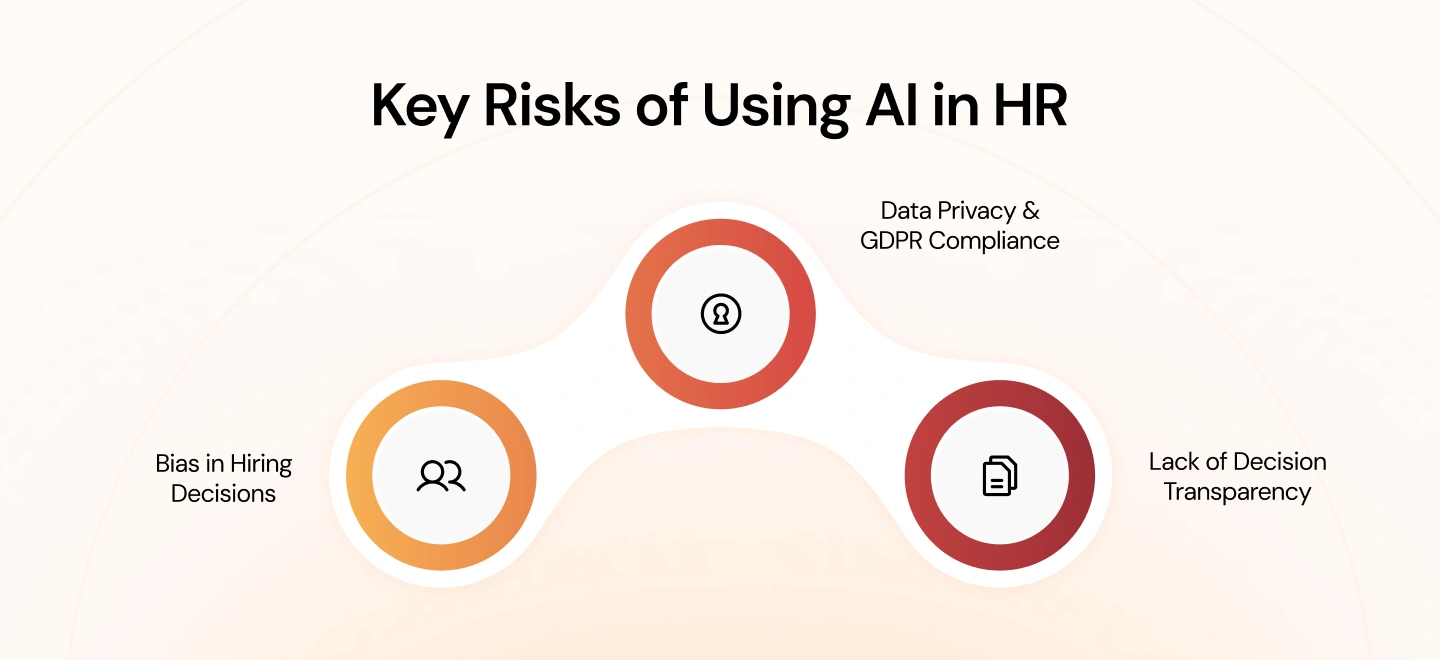
Across organizations, the same pressure points tend to surface once AI is embedded into HR workflows. They become visible during hiring reviews, grievance cases, and audits rather than during initial implementation.
1. Bias in Hiring Decisions
Models trained on historical resumes and hiring outcomes tend to mirror earlier preferences. Patterns such as school pedigree, prior employers, or career gaps can be weighted in ways that favor certain profiles. In practice, this shows up when equally qualified candidates progress at different rates through screening, and the reason for that difference cannot be tied to job-related criteria.
2. Data Privacy & GDPR Compliance
Training and operating these systems requires combining multiple data sources, often including performance records, communications, and personal information. During reviews, questions arise about purpose limitation, lawful basis, and data minimization under the General Data Protection Regulation (GDPR). If the organization cannot demonstrate why specific data points were used and how long they are retained, the exposure is clear.
3. Lack of Decision Transparency
Challenges typically emerge when an outcome is contested. A rejected candidate asks why they were screened out; an employee disputes a rating that affects compensation. If the system cannot show which factors influenced the outcome in terms a non-technical audience can follow, the decision is difficult to defend and may need to be revisited.
How to manage these risks
Effective controls align with how these issues surface during real decisions and reviews, so that evidence is available when it is needed.
1. Bias detection and mitigation aligned to hiring workflows
Review outcomes at each stage of the hiring funnel across relevant groups, and investigate where progression rates diverge. Where differences cannot be explained by role requirements, adjust inputs, features, or thresholds and document the change. Maintain records of these reviews so they can be produced during audits or candidate challenges.
2. Data governance aligned with General Data Protection Regulation (GDPR) requirements
Maintain an inventory of data used by each model, including source, purpose, access, and retention. Record the lawful basis for processing and ensure consent and notices reflect actual usage. When models are retrained, update documentation so there is a clear line between the data used and the decisions produced.
3. Operational standards for explainability in decision-making
For decisions that affect hiring, performance, or pay, retain a trace of the factors that influenced the outcome and present them in plain language. Managers should be able to explain which inputs mattered and how they were weighted at a high level, without relying on technical teams. Keep examples of these explanations as part of case files so similar situations are handled consistently.
Conclusion
Across most organizations, AI in HR does not fail because the technology falls short. It tends to stall when it is introduced into one part of the process without changing how the rest of the system works. Screening improves, but onboarding remains manual. Performance data becomes richer, but it does not feed into planning. The result is progress in isolation, not at the level where it starts to matter.
Where it does work, the shift is less about adding tools and more about connecting decisions. Hiring signals carry into development. Performance data informs workforce planning. Patterns are picked up earlier because they are not locked inside one function. That is usually where the real value shows up.
If you’re looking to move beyond isolated use cases and apply AI across your HR workflows, book a consultation with Blazeup to explore how the Core HR Agent can be implemented in your organization.
FAQs
Current production implementations include IBM’s AskHR (2.1 million annual employee conversations, 94% resolution rate), HP’s predictive attrition analytics ($300M documented savings), Integrity Staffing’s AI recruiting agent (66,000 candidates engaged, 0.5% opt-out rate), and Zapier’s company-wide AI integration across hiring, onboarding, and performance management. These represent operational systems with measured ROI, not pilot programs.
 Jamie Ho
 Sathvik Bellave